Away TravelTravel goods2025
Away Travel Mobile Redesign (Concept)
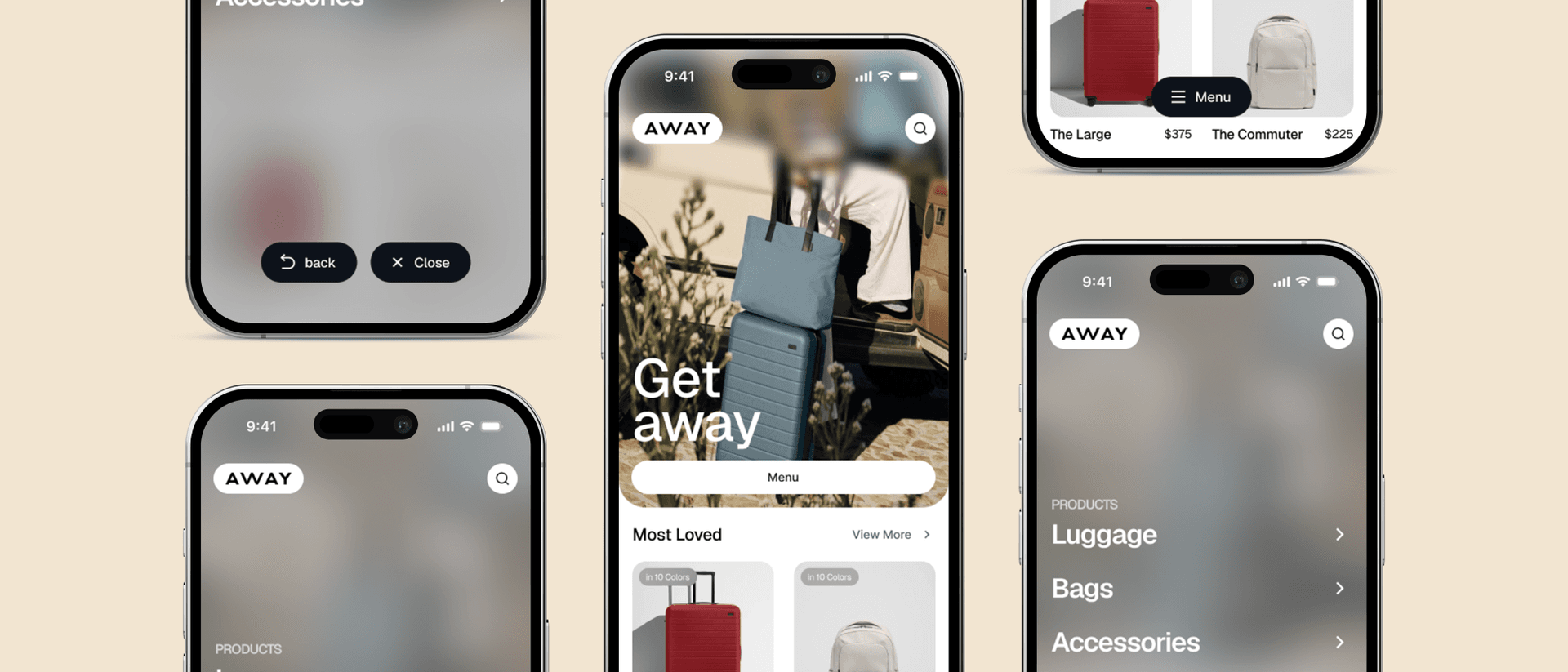
A concept for Away's mobile site: the menu moves from the top bar to one floating button, right where your thumb is.
An unasked-for redesign of Away's mobile shopping: a floating Menu button at the bottom, a menu that opens over the page, and a calmer home screen.
Away sells suitcases and travel bags, and plenty of people shop for them on a phone. This is a concept I made for its mobile site, unasked: same brand, same products, with the navigation moved to where your thumb already is.
1. The menu is out of reach
Away's mobile site works fine. But the menu, the search and the basket all sit in the top bar, and on a big phone held in one hand, the top corner is the hardest place to reach.
2. One button at the bottom
So the top bar keeps just the logo and search, and the menu becomes one floating button at the bottom of the screen. Tap it and the menu opens over a blurred copy of the page you were on, so you never lose your place. Submenus go one level down, with Back and Close where the Menu button was.
3. A calmer home screen
The rest gets lighter, in Away's own clean style. A full-height photo with “Get away” and one Shop button, then a Most Loved row: each product on its own card, with its price and how many colours it comes in.
4. What I'd test
It's a concept, so there are no numbers behind it. The trade-off I'd watch is the basket. It moved into the menu, which costs a tap right when people are closest to buying. The full file is free on Figma Community.
Delivered
- Mobile home screen
- Floating navigation
- Menu and submenus
- Product cards
- Figma Community file
Questions
Was this redesign commissioned by Away Travel?
No. It's a concept I made for Away's mobile site on my own, not work for the brand.
What does the concept change?
The menu moves from the top bar to a floating button at the bottom and opens over a blurred copy of the page. The home screen gets simpler: one photo, one Shop button, and product cards with price and colours.
Why move the navigation to the bottom?
Because the top corner of a big phone is the hardest place to reach with one thumb, and a lot of shopping happens one-handed.
Can I see the design file?
Yes. It's free on Figma Community, linked at the end of the case study.
Want one of these for your product?